
Media library
Here you add images to a project and use them on screens.
Where an image comes from#
Select an Image — or a list row whose leading part is an image. Image has four sources:
| Source | What it is |
|---|---|
| Library | An image uploaded to the project. |
| Asset | A picture bundled with your app. The list of names comes from the app; it draws even without a network. |
| Link | An address that starts with https://. |
| From data | An address that arrives in data — see Data. |
Upload an image#
- Choose Library.
- Press Upload image and pick a file.
- Click the image in the grid to use it.
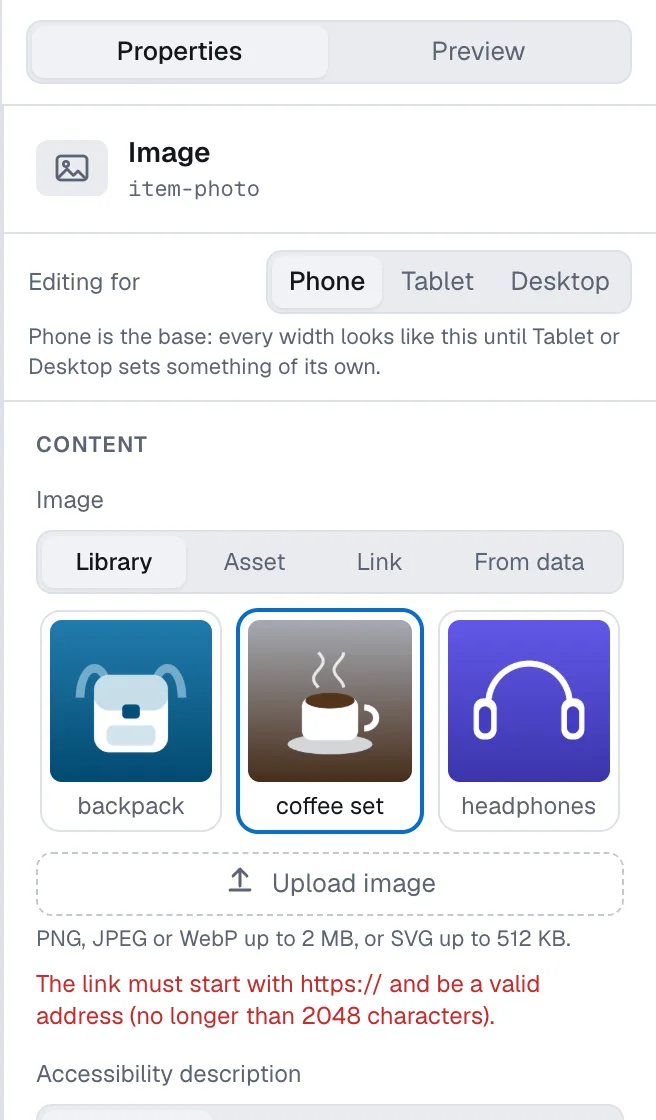
The library belongs to the project: every document of the project sees the same images, and every editor of the project can add to it.
Formats and sizes#
- PNG, JPEG or WebP up to 2 MB.
- SVG up to 512 KB.
The check reads the file itself, so renaming a file to another extension does not help. If an image is too large, reduce or compress it before uploading.
SVG#
An SVG is checked on the server before it reaches the library: scripts and external content are removed from it. This takes a moment — the image appears in the library by itself; reopen the library if it does not.
An SVG is refused when it is too complex for a phone to draw, when it only wraps a bitmap picture (upload the picture itself instead), or when it has no viewBox and no size. The message names the reason. If your SVG is refused, export it again as plain SVG, or as PNG.
How the image is shown#
- Aspect ratio — square, wide, classic, or your own pair of width and height. A height set in Style is stronger than the ratio.
- How it fits — fill the frame and crop the excess, or fit the whole picture in.
- Circle — crop the picture to a circle of a given diameter.
- Accessibility description — a short description for people who use a screen reader. It can be translated like any other text.
When uploading is not available#
- Sign in to upload images to the project. or a refusal from the storage — your role cannot add images, or the session has expired. Sign in again or ask an admin.
- New files cannot be added while publishing is off for this organization. — the trial has ended or the licence has expired. Images already in the library keep working. See Trial and licence.